
Chapter 15 · 15.1
Becoming an affiliate and sharing your referral link
Are you happy with WebOké and keen to tell others about it? With the affiliate programme, you can earn from it. Bring in a new customer through your personal referral link and you'll receive a fixed commission. Signing up is free and your link works instantly.
The explanation and the rates
In My WebOké, click Affiliate programme under the menu on the left. If you're not yet an affiliate, you'll first see the explanation.

At the top, you'll see how much you can earn per customer you bring in (1). Below that, you'll see how it works in three steps (2):
- Share your link: put your personal referral link on your site or blog, or share it with your network.
- Customer orders: if a visitor becomes a new paying customer within the stated period, they count for you.
- You earn: after the waiting period, your commission becomes final and you can have it paid out.
Below that, you'll see the commissions per product group (3). Click a group to see the amounts per product. For each customer you bring in, you receive one commission: that of the most expensive product in their order.
Signing up
- Tick the box next to I agree to the affiliate terms (1). Use the link to read the terms first.
- Click Become an affiliate, free and instantly active (2).

You'll see the message Welcome to the affiliate programme!. Click OK. The page now shows your own affiliate dashboard.

Comparison site or professional affiliate?
Do you run a comparison site or expect to bring in many customers? Then use the Comparison site or professional affiliate? block (3). Enter your website or platform, tick the box for the terms and click Request custom rates. We review such requests by hand, and we agree the commissions together with you.
Your referral link
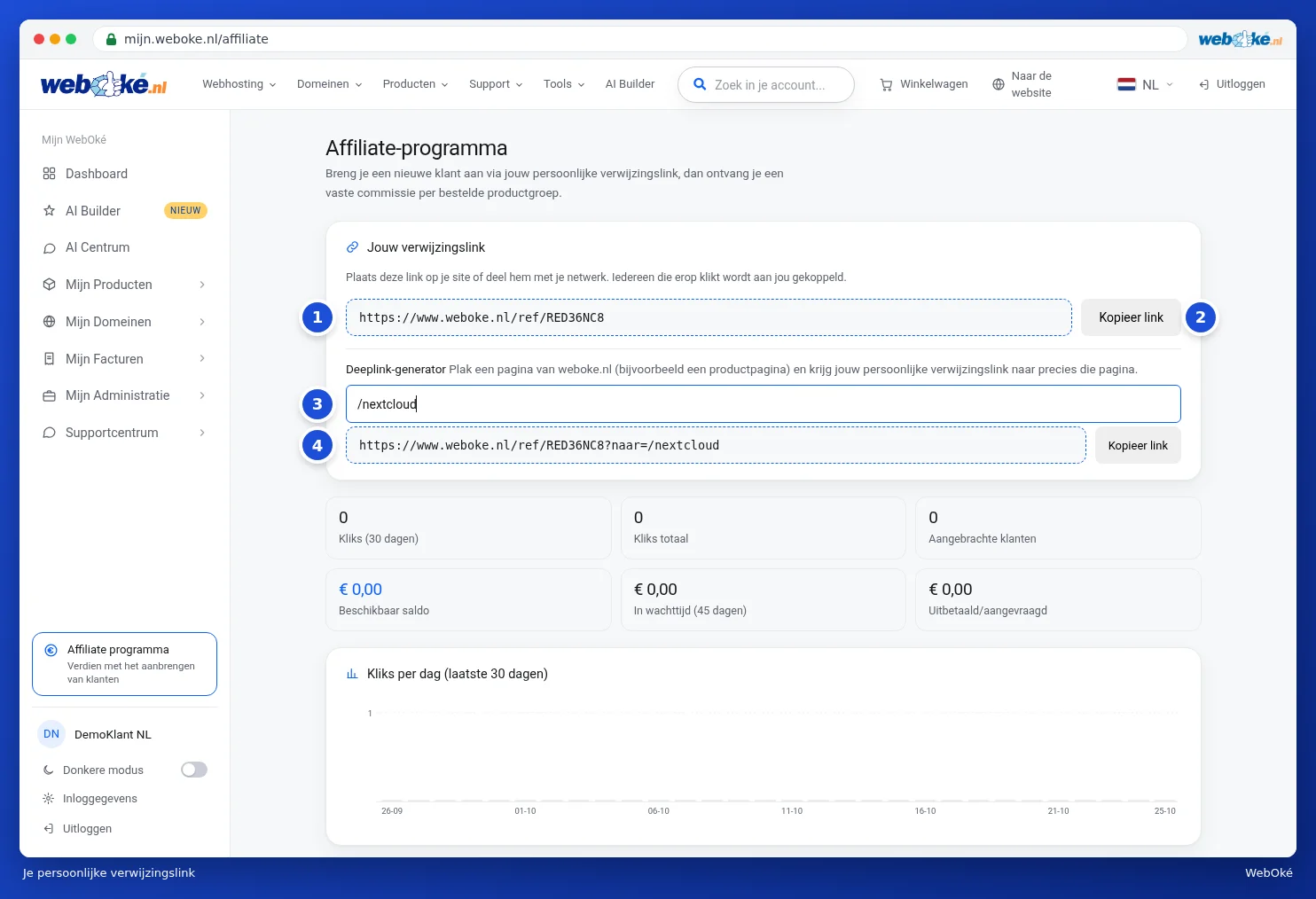
Once you've signed up, you'll see Your referral link at the top of the dashboard (1). Anyone who clicks that link gets linked to you. Click Copy link (2) and paste it wherever you like: on your website, in a newsletter, in a message to a friend or on social media.
Linking to a specific page
Want to link to a specific page, for example the page about Nextcloud? Then use the Deeplink generator:
- Paste the address of a page from our website into the field (3), or just the last part, such as /nextcloud.
- Your personal link to that page appears below it immediately (4). Click Copy link next to it.
A visitor who clicks that link lands directly on that page and is linked to you just the same.
Please note: only pages from our own website work as a deeplink. Only the account owner can manage the affiliate programme, not an additional user of the account.
Tip: explain why you recommend WebOké. A personal recommendation works much better than just a link.